AI intelligence & networking
This article is a chapter in a larger book. Start reading here »
This article needs a cleanup of the first person to the third person issue. You vs “one”.
Intelligence at the top layer
Just like social systems in Synapse live at the highest layer of the operating system, AI too lives at the highest layer.
This intelligence is powered by the local device in question, ensuring privacy. It watches everything you do and type but does not have the ability to remember that data beyond a 20 minute context window. It has no ability to communicate what it sees with anyone but you for privacy purposes and only stores what it sees in temporary memory (RAM).
As you perform actions, it watches those actions and creates suggestions which show over the collaboration window. A skinny >] arrow on the left of the suggestion allows one to switch between the collaboration window and the suggestion. A triple dot menu •·· allows one to move between recent suggestions. Suggestions fade in very gently so as to not disturb the user, they also fade out after 20 seconds.
Smart privacy
Synapse is designed to be social by default, but some actions are better left private. By default, when entering an application of any sort, one sends a signal to the world that one is using that application. However, if the application is sensitive in any way, or could be construed in any world as being sensitive, the intelligence layer will automatically default to private.
Let's say you're writing a document on the architecture of a bridge, by default, others can see that you're writing a document. The AI will create a signal so that when people see you on their wallpaper, they can see a very vague description of what you're working on e.g. “architecture.”
However, if you write anything sensitive in this document, such as something sexual, you will disappear from people's wallpapers as a protective measure without any action on your part.

You retain manual control over your visibility. By tapping and holding the lock and sliding up (or clicking it repeatedly on a PC), you can cycle through the following states:
Private (red lock icon): The default, automatically triggered state. You are completely hidden.
Signaling on (orange unlock icon): Your general activity is broadcast to others' wallpapers.
Public (green people icon): The entire document is visible to anyone, and they can request collaboration access.
Opening discreetly
One can open any application discreetly by tapping and holding or right-clicking it and selecting private open. This also removes the ability to earn any accolades or rewards for using the application.
Developer control over application defaults
While the system sets the unlock icon as the default for applications, developers are given control to change this initial state. The options available are:
Defaulting to completely open
Defaulting to signaling on
Defaulting to completely closed
Requiring the user to choose a setting upon launch
Requiring the user to choose a setting upon a particular action.
Passive matchmaking
Whenever the people icon (green) is activated in an app, the app will go searching for people interested to collaborate on the app with you. Once it has found a list of ideal people in your digital society, potentially interested in the same thing as you, or working on something similar, it will reveal this through a passive signal that creates a suggestion that shows over the collaboration window.
Once again, developers will be prompted as to the ideal candidates that the AI should seek out.
Outside apps
All non-native apps on the operating system can be opened in Synapse as a form of sharing the experience with the world. The only reason a person would open a non-Synapse application in Synapse is to share that experience publicly. Therefore, we can take the act of opening an application in Synapse as a desire to share that application or experience with friends by default.
Challenge signaling
As Synapse’s secret weapon is passive signaling, AI can greatly enhance this passive signaling throughout the experience. Let's say someone is exhibiting the behavior of getting stuck while editing a video, getting a particular error over and over.
Just like errors are hard-coded into software, in Synapse, application developers are encouraged to code events that would help the AI understand when a user is particularly struggling with something. The benefit to the developer would be that anonymous data is automatically sent to them when this happens and the benefit to the user would be that the AI would be able to get a signal that the user needs help.
If the green (people icon) status is set on the application, when the AI sees the user is stuck, it would search through a myriad of individuals who have helped others in the past and are online, and then ask the most qualified individuals to help the individual in question on a users request.
In the bottom right panel should show:
“Are you struggling to split the video in the timeline? I can call on potential helpers.”
Designer tips
Designers, please consider lit beacons and veterancy in the calculations.
The key is that it would strongly rely on people in the same digital society by default encouraging connections primarily between people of shared values and only reaching out beyond that if no great candidates are available.
Learning & events
When consuming learning material on a particular subject, the AI could find others moving at a similar pace, learning a similar thing, and suggest you challenge them to a time-based, temporary learning challenge within that domain of knowledge.
Frequent learning in a chain of a three-hour session could encourage the AI to suggest. “Want me to find others learning the same thing so you can chat about what you have learned?”
If yes, “I found five other people who are learning about this in your Deme that have a calendar space open on Wednesday the 29th at 3 p.m. Would you like to suggest a meeting place?” If they respond positively, the map should open, suggesting a digital, not a physical space.
Such a prompt could be given to all the users at once and would only be confirmed if enough people were to agree at the same time.
This should only be considered if it can be implemented in a way that doesn't feel invasive to the user. Note Western individuals in particular do not like their actions to be shaped as they value self-initiative. This is something Eastern individuals often don't have a sense for, so if you are from the East, be aware of this fact.
Privacy
These signals are temporary. The AI is not storing and creating a database of information on you, but is rather temporarily getting to know you in snippets, figuring out ways that it can help you make your experience social, and then going away and deleting the information at the end of the session. Nothing may be shared from the user's information and the user should be constantly made clear of that fact. This could be through a help icon next to these suggestions, which clarifies that no request was made to such people yet.
It's important to steer clear from feeling creepy even if people are in complete control and even if their privacy is fully protected. The key is always to allow the person to start the action rather than doing anything for them without their permission.
Notifications
Although the AI remembers very little about you, it should remember what sort of notifications you're generally interested and not interested in, so that it's tailoring its approach to helping you based on what you actually want to do, rather than consistently bothering you with things you're not interested in.
It shouldn't remember what you like as in content. It should remember what sort of notifications you like. Namely that you like notifications about social events, but not that you like notifications about social events on bicycling.
3rd-party AI modifications
Unlike applications which have a space, users should be able to install applications called AI modifications that change how their AI behaves and acts on their behalf.
Privacy concerns
Whereas the other applications of AI have encouraged the deletion of all substantive information and kept any private information that it must store on device, applications should be allowed to breach these high privacy standards provided the user in question explicitly opts-in. Users must be informed of the consequences of sharing data in the strongest possible terms.
Work applications
A great example of an application that could be developed by a third party that could seriously enable companies and that requires more invasive technology would be work-based applications.
When it comes to work within a particular company or domain, if the AI is approved by the company, it should have radically different privacy controls, provided that all the data relates to the same company and works within the same framework.
It could actively watch what people are doing when it pertains to applications related to the company and try to create dynamic collaboration, spotting potential pitfalls and preventing blockers or conflicts before they even occur without the process being user directed as required by default elsewhere.
Strong safeguards must be in place to ensure this doesn't turn into surveillance generally and that workplaces that use such applications are forbidden from sharing that data.
Social & dating as 1st-party
If people are lonely and want to be around others and want to push the AI to help them solve that, the AI could do this over the course of two or three weeks, deleting the data afterward.
It should work like a indicator but last up to a few weeks. A clear and explicit dialog box explaining the privacy difference would be made. And then a quick couple of questions on what the individual is seeking could be given via the AI asking a few critical questions.
What are you looking for?
Others interested in gardening?
Gaming friends?
A date?
When are you free?
Anytime the calendar is empty?
Afternoons on weekends only.
Etc.
Based on the response, it could proactively seek out others with the same desires and status in the same Deme or digital society. Based on the desires of the individual, it could immediately find you what you're looking for. For example, a live workout session with other members of the society that is approachable for grandmothers in their 80s.
Or if someone is seeking deeper connections AI would ask permission to get to know you based on what you do for a few weeks and actively seek to help you make connections but then afterward delete all data on you.
The AI could get to know you deeper based on what you do, write, and enjoy, and find people that are also interested in the same things that you might like to get to know. They could actively recommend open game sessions, social hangout sessions, etc.
When in this setting, since privacy is reduced for this time, it would allow a much greater degree of context to be given before conversations are started. It could explicitly tell you about the people that you're about to meet and the potential overlaps in likes and dislikes before you get started.
3rd party
The AI will always seek a third party when connecting two people for something that would be quite personal, like a date, allowing that third party to potentially become a matchmaker, somebody in common they both know. But it would always and only do this at the request of all parties involved, saying, hey, I found somebody that knows somebody. Would you like to get an introduction to this person via them?
By including third parties, it creates context for conversations and makes the cold opening a little bit warmer.
Ending the status
Once the three-week period is up, a dialog asking the individual if they should continue or delete the data should pop up, allowing them to set how long the status should continue and asking questions to help hone it’s approach.
AI signal scan
Just as the AI is constantly on the scan for opportunities to connect people it should also look for the opportunity to surface signals that are not necessarily social but practical.
Let's say a user expresses frustration that they can't solve a particular problem. The AI could actively prompt the individual. The AI could toss a penny into the fountain in the public square, which would act like a wishing well.
Signals to scan for:
You have knowledge that others would pay for…
You're trying to solve this problem in a way that other people have already discovered to be inefficient. Here's a more efficient version.
Repeated Error Messages — AI can use this as a signal that the user needs help
Searches for applications that don't exist.
You have a skill X company needs (and vice versa)
User goes through the process of buying a piece of software or a digital asset but stops at the final payment page, indicating a potential price sensitivity or a search for a better deal.
A list of things developers need to add to every application.
Those who are not developers or designers should skip this.
All these different features require certain things from every single developer. This is an attempt to bring those together, at least for this article.
2D icon
Building look
Application distribution company
Default permissions when collaborators are dropped in.
A description of the application including a high-level category and a low-level category.
A clear indication of how much veterancy from other similar apps should play into veterancy in their app.
Any edits the application creator wants to do to the rank system and how they're calculated and how those signals are sent back to Synapse.
It asks what permissions AI should have to see users using apps to clearly distinguish what is private from what is not.
Clear descriptions of each option for AI navigation.
AI ideas that were viable
Time Zone Awareness: A simple sun/moon icon next to friends' names to show if it's day or night for them, preventing accidental late-night pings.
Recommended video of the day by community.
Recommended song of the day by community.
Co-location Indicator: A small link icon appears when two or more friends are in the same app or document, allowing one to join them with a single click.
"Open Door" Status: A friend can set their status to "Open Door," indicating they're available to be instantly dropped into a voice or text chat.
Shared Resource Library: A visual "shelf" where members can place useful files, links, or tools for others in the community to use.
The "Help stats": A user can activate a "beacon" if they're stuck on a problem, which discreetly notifies others in the community who use the same app.
A "Nudge" Button: A simple, non-verbal way to say "thinking of you" that sends a gentle, one-time animation to a friend's screen.
The Community Jukebox: A list where users can queue up the "Song of the Day" for others to listen to.
Donation box: Shows what people are donating to as a group
Sidewalk Chalk: Drawing or writing ephemeral messages in a designated public area that automatically fade after 24 hours.
Constant radio station that has to be clicked on to turn on. Deme-related.
Events area in which large groups of people within the Deme are featured, including what they're working on, even if they're not close connections.
The AI actively looks for users who are struggling with a specific problem and then highlights that problem as common as a passive signal to the app’s creators and veterans who can help.
The "Campfire Catalyst"
Concept: The AI can identify when a series of individual questions or problems are coalescing into a topic worthy of a larger, live discussion.
How it Connects People: If the AI's Q&A forum in the Veterancy panel receives multiple, similar questions about a new feature in an application, and it sees two or three active Help Beacons on the same topic, it will conclude that a simple Q&A is insufficient. It will then automatically propose a "Campfire" discussion. It would send an invitation to all interested parties: "The new 'particle physics engine' is a hot topic. A Campfire is being lit in 15 minutes to discuss best practices and troubleshoot common issues. Join us." This turns scattered confusion into a focused, community-building learning session.
The "Ghost in the Machine" Pairing
Concept: The "Ghost" replay feature shows what someone did. The AI can use this to find perfect collaborators.
How it Connects People: When you light a Help Beacon, the AI doesn't just search for people with high Veterancy. It searches the "Ghost" archives for users who have recently and successfully performed the exact action you are struggling with. The recommendation it provides is hyper-specific: "Daniel not only has high Veterancy in this app, but his 'Ghost' shows he successfully configured this exact export module yesterday. He is the most relevant person to help you right now."
Communication
Rather than just being a place to join particular activities, a kiosk in the back can be clicked on. It’s a form of passive communication between all those in your Deme. It shows:
Activities popular in your Deme
Trending tools
Each window comes with a collaboration panel on the bottom right.
Dragging any person from the desktop into the collaboration panel invites them to see what you're doing.
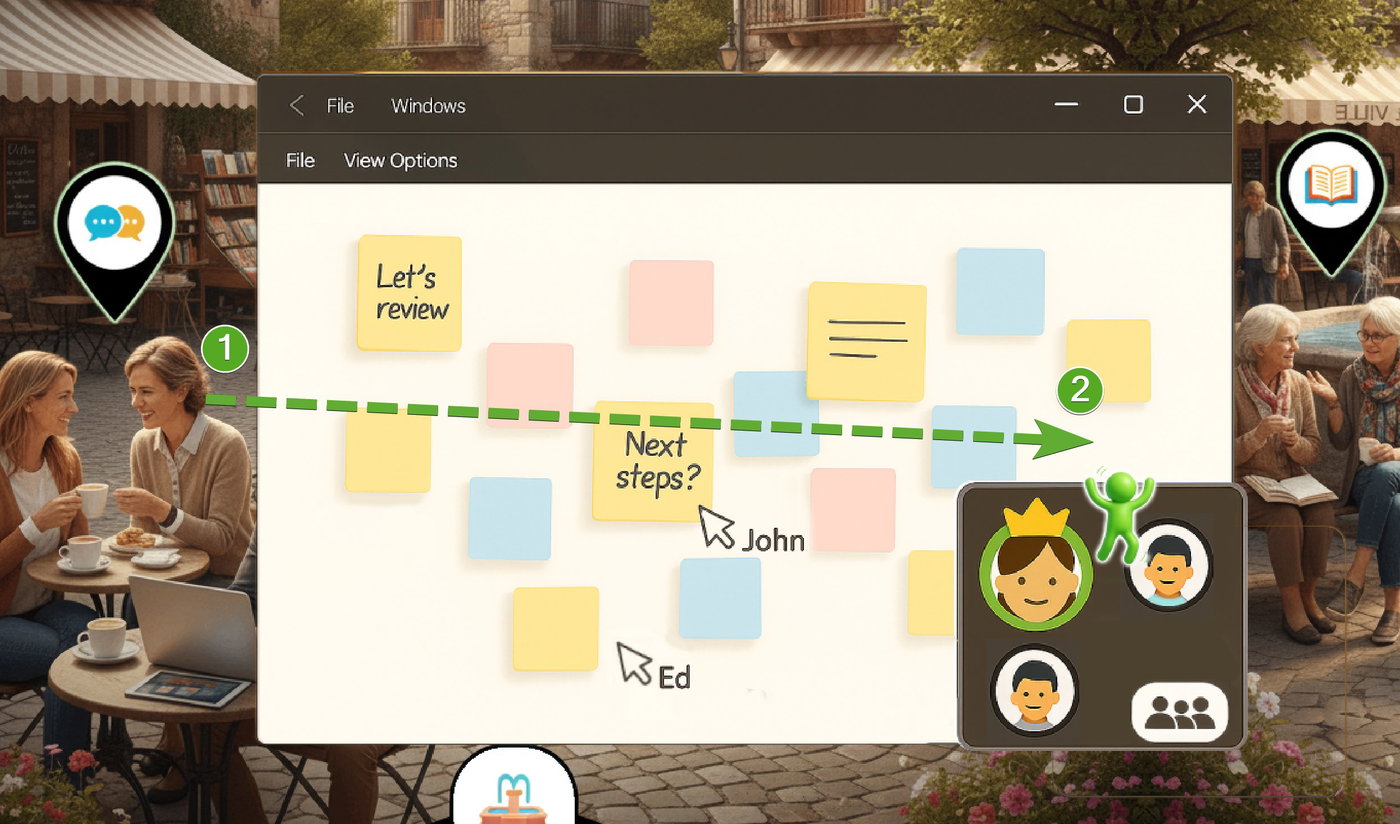
Dragging them into the application allows them to collaborate, starting them where they were dragged in.
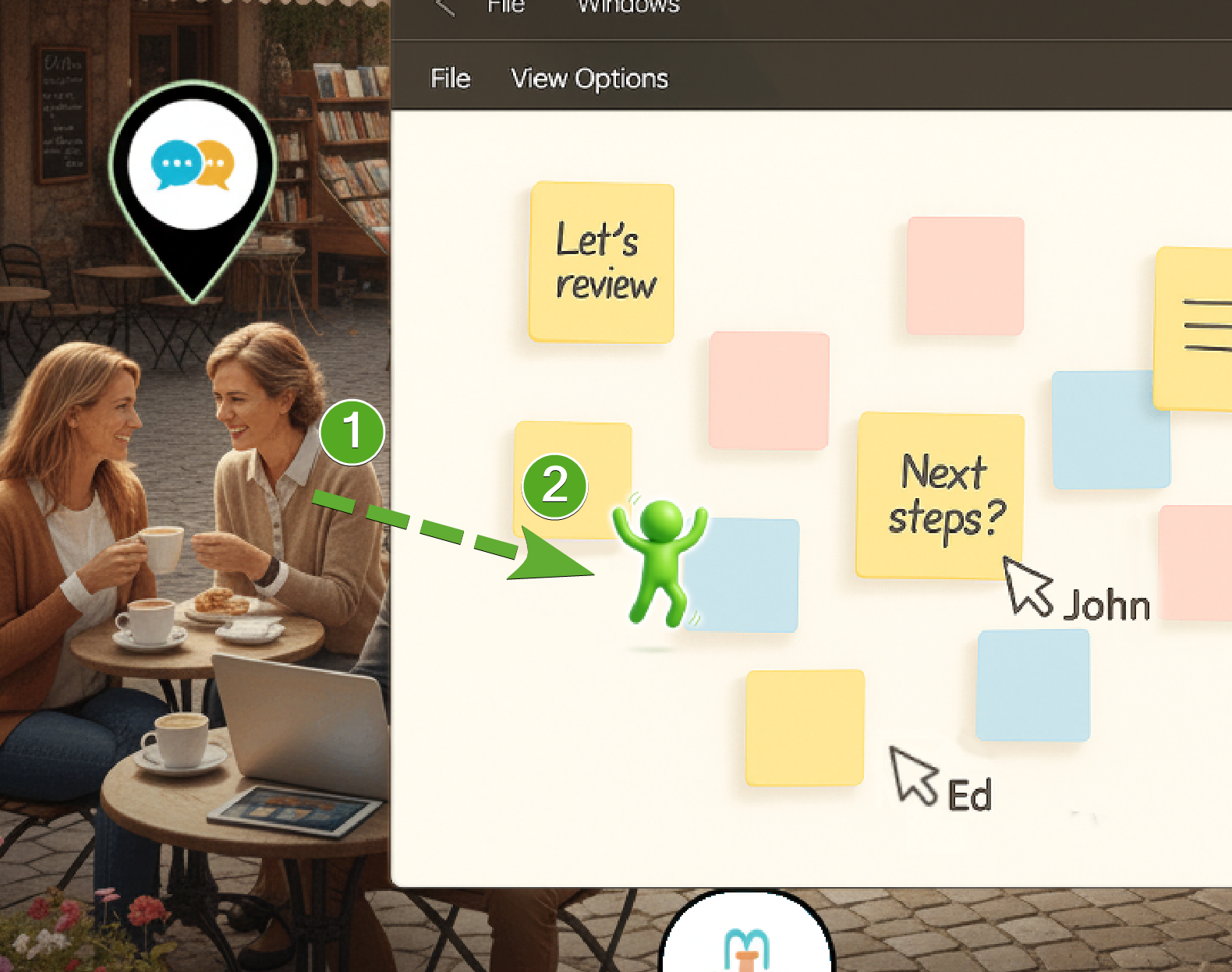
In a 3D world, dragging them into the scene causes them to “spawn in” exactly where you've placed them.
In any gathering, whether 2D or 3D, the person who started the group has the power to command the attention of the group to avoid the problem of trying to line everyone up.
When entering a collaborative experience, the person who started it is the driver of that experience. They can change what everyone can see and do.
Questions?
If two people who are in the same Deme are using a particular application, should it look different on the map?
Other question will third-party apps be transformable into first-party ops