Beacons and maps
Start by reading this first »
Veterancy
As you use different applications within Synapse, you gain veterancy in doing so. This is symbolized by a small rank icon next to your name when using that application in a collaboration panel. It lets everyone know who has the most experience engaging in the particular task at hand.
Veterancy and how it's earned in the particular application can be modified by the application creator. Clicking on a rank icon reveals:
A very simple explanation of ranks in that application and how to earn them.
A leaderboard of who has used the application the most within your friends list, Deme and digital society.
A simple Q/A forum with an AI that can answer questions based on other answers.
A list of active help beacons (explained later), from the whole of Synapse.
This panel is located within the collaboration panel, but is not as obvious as opening the collaboration panel itself.
As people rank up, their AI should say “It looks like you're becoming an expert in application name. Would you like to be notified when newer application users are in need?”
Conversational context within applications
Another way to open the same region is to click the people icon in the bottom right of the panel. However, when this area is opened via the people icon, it recommends people who are close to you that you can invite to collaborate based on their use of the application and relationship to you. Their openness to collaboration as set when they entered the app.
Depending largely on the app, but not without user consent, users using a particular app are visitable by people in their Deme by default. The goal is to have people who are working on applications where social interactions are helpful be in the equivalent of a Discord voice channel working on the app themselves.
Depending on their settings, this Discord voice channel may be locked or open. When open, it sends a passive signal that anyone is welcome to join them in while they work on the application. These settings must be narrowly tailored by the application developer to represent the best settings for the relevant application.
Not only that, those that have opted in to allowing others to join them (unlocked voice channel) become far more visitable within home screen wallpapers based on those others veterancy in the application and their closeness to you.
Beacons
In the same area, any individual or group of people can light a help beacon. A help beacon sends everyone a signal that you need help solving a problem in the application in question.
It also does several things:
It asks the collaboration lead what issue they need help with.
It searches the database for potential solutions and offers them (AI visual guidance would be ideal).
It assesses if the issue is urgent and not findable in the database. And in the rare case that it believes that it is urgent or critical, it will offer the individual in question to attach a bounty to the solution of the problem. Namely, it'll ask them, would you like to attach X Digital Gold to the solution of this problem? The user will fill in the X.
It prioritizes your image within others' wallpapers, even more, based on their relationship to you and their experience in the application or application category.
It changes your avatar to holding a flare and standing.
It loads four people who are online within your Deme who you can invite to collaborate.
If non-collaboration leads do this, they must get permission, not only to light a flare but for each person they invite. No more than four in an app can light beacons.
It creates new context to your avatar when it's clicked on by others, explaining what exactly you need help with.
It lists your space as needing help on the veterancy panel.
It lists your need on the Q/A panel, combining it with other similar needs.
It starts an action record noting steps taken from when the beacon is lit to when it gets resolved.
Application creators can modify how this system works based on their individual application. By default, if a the beacon is lit and someone joins the session in question, when the individual leaves the session in question, the individual who resolved the issue will be asked how they resolved the issue. An answer is required to exit both ways, either in the affirmative or in the negative. It will list the answers for others dealing with the same issue.
The beacon lighter, on the other hand, will be asked to “OK” an upload of an action record instead of describing how the issue was solved.
“To help others find the solution, please hit “OK” to upload a detailed action record that others can download to see how you solved the issue. This may reveal parts of what you were working on.”
Flags
Each space has something called flags in it, which can be handed out to people in that space by the host. When a person in a space holds a flag, their desktop wallpaper or avatar also holds a flag. And this flag represents what they're doing as an open invitation to join them.
Unlike beacons, which are a specific urgent request for help, flags are just a symbol of invitation to join the event.
Designers only
Design flags to have minimal friction, but design beacons to have strong friction around more than one person lighting them in the same collaboration. So that flags are used for invitations and beacons are used for calls for help. And that beacons require much more intentionality than flags.
Flag holders should not need to continue to hold the flag in their hand in AR/VR, per se. Nor should beacon holders.
The owner of the application is sent all the questions gathered about the application by those using it (privacy law may apply).
Status
Statuses must be reset whenever set to invisible or do not disturb each time a person logs on or each day. So that one act of making oneself invisible doesn't end the whole functionality of the OS for that person forever without them realizing it.
Statuses must be reset whenever set to invisible or do not disturb each time a person logs on or each day. So that one act of making oneself invisible doesn't end the whole functionality of the OS for that person forever without them realizing it.
How the world works
Your city
Just like the public square wallpaper is relative to an individual, in that each person sees different things in their own public square, so each city is also relevant to only that individual.
City attributes:
Each application one uses automatically becomes a building in one's city.
The position of these buildings is automatically arrange based on how often one uses them and how often one collaborates in them.
The moment one grabs any building on the map table and place it somewhere, it will stay there forever.
Dragging a person from one's wallpaper into any part of the city invites them to explore the city with one in that area.
Backing out of an application along with another person by unlocking the door allows both individuals to see the city.
Dragging a friend onto another friend automatically creates an empty lobby. And then dragging a city structure onto that empty lobby changes the application of that lobby to that “building” of the city.
Even though by default everything begins as a city, one can customize one's city so that each building is actually a park or some form of scenery.
In the early days, the operating system will not be very customizable, but customization options will grow over time.
Each city has a road network and that road network by default crosses it north to south and east to west no matter what. Driving to the end of the road allows one to exit one's own city to enter a new non-relative world.
Friends houses
People one interacts with frequently have their houses automatically relocated to your city as a teleport. A minimum of three interactions with an individual is required for them to show up in the city.
And those who are the most frequent collaborators are the ones who show up closest to city center. However, these houses are in their own district, separate to one's applications and out of the way in such a way that they won't be immediately visible when looking down toward the map table from the default public square view.
The people are organized in districts based on attributes, namely which applications you collaborate with them on, whether those are work applications, social applications, games, or other applications. This will determine the clusters of houses and how often you collaborate will determine their orientation toward you.
So for example, if you play games with certain people, even though you're playing different games with different people, all gamers will be in one district with frequent gaming buddies being closest to city center.
Apps
Applications often used by friends and not yet discovered by yourself are also seen in the city with the names of the friends that use that particular application. Once again, these applications are organized by category and positioned closest to city center based on frequency of use.
FAQ:
Can some buildings be set to private so that when people visit my city those buildings are kept invisible?
Yes, one can also intertwine visibility with the groups that they have dragged their friends into on the right “people” menu.
Deme city
Outside of one's personal city is a open field that marks the end of one's own city and the beginning of a new world that is shared between everyone in one’s Deme. The leadership of the Deme determines the order of things in the Deme’s city.
By default, each citizen of the city has a house in the city which is a teleport to their house in their own private city. However, when people visit they can only see the things explicitly for public eyes.
In the downtown of the city, are automatically clustered the 100 most popular applications based on the usage data of the Deme and organized into districts by application category. The style of these buildings can automatically be set by the city’s leadership.
FAQ:
Who can enter the city?
Only Deme members by default and anyone else the Deme leads allow.
Can one visit others public squares within the city?
Yes, entering via the house of the individual represented in the Deme city, one can enter parts of the city open to other Deme members.
What do others see when they come to my city?
By default, they only see the city as empty without the people in the public square or items laying around. Each space has a permission set, including the public square and one's own home, that allows individuals to granularly set what can and can't be seen by which groups of people. This includes if they can see, pick up, and move items.
Can you own more property in the Deme city?
The Deme‘s leadership can grant property to individual Deme members, these Deme members can then in turn create a teleport link between the Deme city and their own city, revealing any specific building in the city they want to the public.
What does my house exterior look like to those in the Deme?
In the Deme city, one's house, on the outside, looks like a default house until one sets a particular look to it. Certain Deme may change what default houses look like and require houses within certain constraints of visual style to maintain a cohesive theme throughout the Deme. For example, some Demes may have only highly modern buildings, where others will constrain designs to be medieval.
What does my house interior look like to those in the Deme?
This depends on the permissions one sets. One can:
Restrict all visitors to a preset guest room.
Grant full house access, but with invisible items.
Grant full house access, but with immovable items.
Grant full house access with full permissions.
Can more than one person live in a house?
Yes, in general, one can allow oneself to share one house with as many people as they want. However, when they log in, that's the house they'll see on the left of the public square.
Societal city
Each Deme city must have, at least, four entry/exit roads which themselves have a green field between them and a new space called the societal city.
Within the societal city, each person that is a citizen is represented by a single house. These houses are clustered in groups, making up a district of the Deme the citizens come from. These districts don't look like the Deme city as the layout of the houses is automatic within the societal city, but are a group of teleports to houses of members within that Deme. Districts are automatically clustered with the most active at the center and the least active at the periphery.
In the downtown of the city, are automatically clustered the 20 most popular applications in each category based on the usage data of the society. The style of these buildings can automatically be set by the societal leadership.
City leaders are able to change where districts are located and add other buildings and teleports to the city including roads, public parks, and natural scenery.
FAQ:
Who can enter the city?
Anyone can enter the city and even see the people walking or driving through the city, but those people don't see them unless they have a visitor’s visa.
Map signaling
When zooming in on the map, one immediately begins to see as many people in the different buildings represented by their avatar’s faces. Close friends are seen prominently in the buildings if they are currently using the application in question.
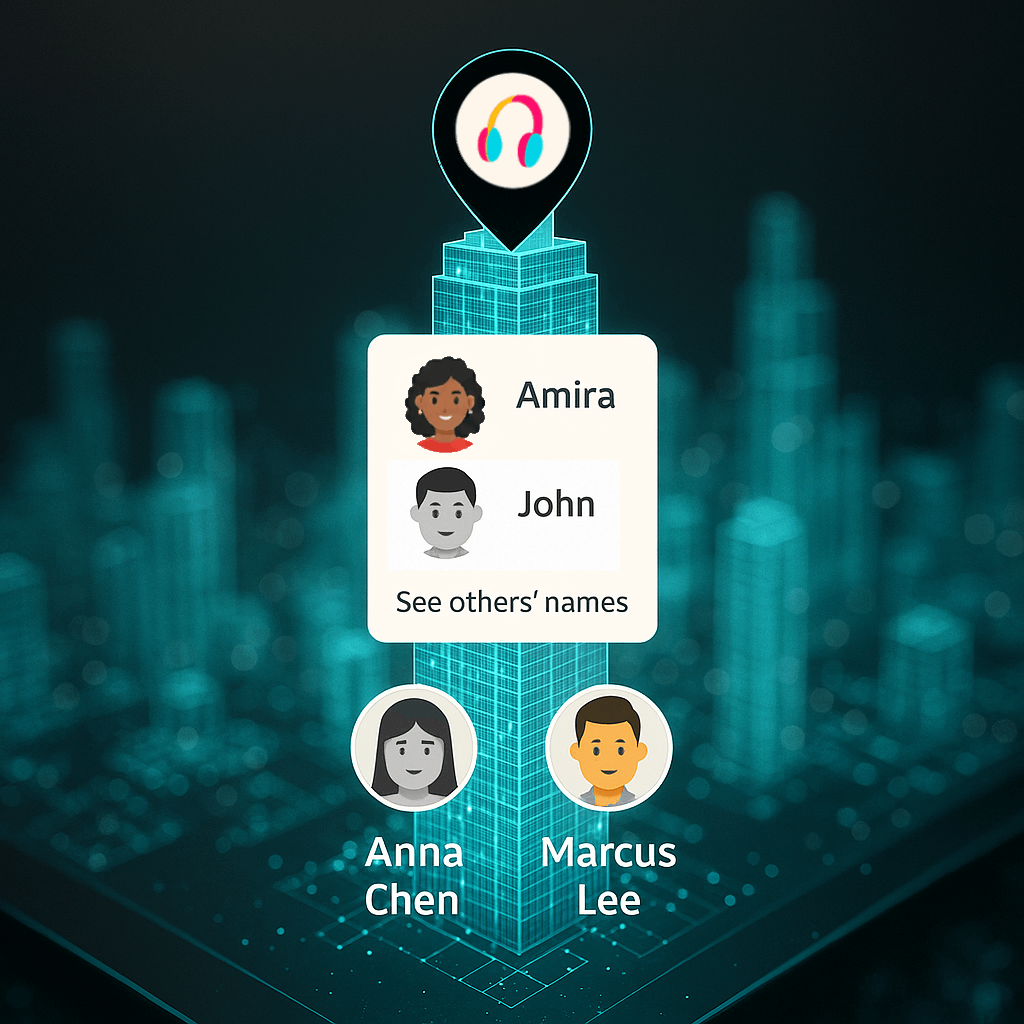
Friends are seen using the app near the top and the members down below. Note that the user interface will likely be somewhat different in reality.
Those that have recently used the application are seen as black and white avatars. People from the Deme and society who are actively or where actively using the app can also be seen in these buildings, but less prominently.
When entering the building itself, via the city, one can see the ghosts of those individuals walking around. But clearly done in such a way that one knows that those people are not actually there and one cannot be hurt by them. Unless one taps on them and sends a request to engage in the activity together.
Clicking on a particular ghost shows what song they're listening to, if their permissions allow for that level of signaling.
The goal here is to create an environment in which people feel as though they can always find an excuse for interacting with others.